Category Archives: Life Journal

Pitt basketball’s biggest March disappointments

It’s hard, really hard, being a Pitt basketball fan.

I’ve been following them for over thirty years, starting sometime back in 1981. ESPN was just starting to get into covering college basketball at the time, and I needed a team to follow. Given I lived in Pittsburgh and was a die-hard Pitt football fan (the seventies and early eighties were Pitt football’s glory days), it wasn’t hard to pick Pitt as my basketball team. Little did I know the crushing disappointments I was signing myself up for.

Believe it or not, recent times (since 2000) are the glory days for Pitt basketball, at least during my tenure as a fan. Pitt has been to the NCAA tournament in 11 of the past 12 years. They’ve made to four Sweet Sixteens, one Elite Eight, and have been one-and-done only twice, which includes this years whooping by Witchita State. They’ve been to the Big East tournament championship game 6 times, all from 2001-2007, and brought home two titles. They’ve also won 4 Big East regular season titles.

In the twenty years prior to 2000, Pitt had been to the NCAA tournament 8 times, never advancing to the Sweet Sixteen. They didn’t appear in any Big East championship games, and only won 2 Big East regular season titles. In fact, the years between 1990 and 2000 were particularly bleak, with only 3 post-season appearances – 2 NCAAs and 1 NIT.

So what’s the problem you ask? It’s the way in which Pitt’s season seems to end every year that has resulted in such crushing disappointments. In fact, it’s not hard to do a search and pull up video of most of Pitt’s March losses since they were all particularly painful in their own way.

As part of cleansing, and hope that this might change the luck for next year, here’s my compilation of the top 10 most crushing NCAA and Big East tournament losses Pitt has suffered in my 30 years as a fan.


#10 – 2006 Big East Championship, Pitt vs Syracuse
Pittsburgh had completed a somewhat pedestrian season by recent standards and entered the tournament as the #6 seed. They proceeded to defeat Louisville, rival West Virginia, and Villanova on their way to the title game where they ran into Syracuse, who had also played three games in three days and may have needed to win the tournament to assure themselves of an NCAA bid.

On paper, Pitt had the superior team, but Syracuse had Gerry McNamara. Gerry McNamara had been on fire the first three days of the tournament coming up with clutch play after clutch play, and this fourth night was no exception. After Pitt had battled back to take the lead in the second half, McNamara hit a three with just over 8 minutes left that propelled Syracuse to victory 65-61. His performance was so legendary that is among the top 5 moments of Big East tournament history recognized by the conference.


#9 – 2004 Big East Championship, Pitt vs Connecticut
In what was becoming an annual tradition, Pitt and Connecticut squared off in their third straight Big East Tournament final, with each having won one. Both teams had stellar regular seasons, with Pitt winning the regular season championship and entering as the #1 seed and Connecticut entering as the #2 seed. In other words, this was the rubber match and had all the makings of an instant classic.

With eight minutes left in the second half, Pitt opened up an eleven point lead and had Connecticut on the ropes. That’s when UConn’s Ben Gordon took over. He scored eleven points as part of a 21-7 run to end the game and win 61-58. He scored 81 points over Connecticut’s three games, which was a tournament record at the time.


#8 – 2006 NCAA Tournament, Pitt vs Bradley
After losing in the Big East Championship versus Syracuse, Pitt entered the NCAA tournament as the #5 seed. Expecting they were going to face a tough Kansas team seeded #4 in the region, Pitt received a huge break when Bradley stunned the Jayhawks in the first round.

Unfortunately, Pitt was unable to capitalize. Pitt center Aaron Gray was dominated by Bradley’s sophomore center Patrick O’Bryant who leveraged the performance to leave early for the NBA. Bradley made a quick exit in the third round at the hands of UCLA, and Patrick O’Bryant wasn’t heard from again as he bounced between various NBA teams before heading to Europe. Meanwhile, Aaron Gray continues to play in the NBA, most recently with the Toronto Raptors.


#7 – 2011 Big East quarterfinals, Pitt vs Connecticut
Pitt finished a stellar season and was destined for a #1 seed in the NCAA tournament. Pitt hadn’t enjoyed much recent success in the Big East tournament, but it felt like this was the year they would make a run.

Unfortunately, Connecticut had Kemba Walker, and he had other ideas. In what is one of the most famous clips in Big East basketball history, Kemba Walker scored the game winner at the buzzer. I’ll let the video speak for itself. Connecticut rode his hot hand to a Big East title and subsequent NCAA championship.

http://youtu.be/yyF6amZw82M


#6 – 2002 NCAA Tournament, Pitt vs Kent State
In Pitt’s first NCAA tournament appearance since 1993, they received a favorable draw by being placed in Pittsburgh as a #3 seed where they proceeded to win both games and advance to their first Sweet Sixteen since 1974. To add to their good fortune, #10 seed Kent State defeated #2 seed Alabama leaving Pitt to play a team from the MAC for a bid in the Elite Eight. To top it off, Indiana upset the region’s top seed Duke in the first game that night, giving Pitt an even better chance to reach their first Final Four.

Behind 22 points from future NFL star Antonio Gates and the clutch play of Trevor Huffman, Pitt lost a hard fought game in overtime, 78-73. Kent State’s cinderella run ended in the next round at the hands of Indiana, 81-69, sending Indiana to their first Final Four in 10 years.


#5 – 2003 NCAA Tournament, Pitt vs Marquette
Pitt followed up 2002’s NCAA tournament with another strong season, a Big East tournament championship, and high expectations as it entered the NCAA tournament as the #2 seed in the Midwest region.They mowed through their first two opponents, beating them by more than 20 points each, before facing #3 seed Marquette in the third round.

In what’s becoming a theme, Pitt ran into a Marquette team who had a talented junior guard by the name of Dwayne Wade, which you may know better as D-Wade these days. He lit up the Panthers for 22 points and made numerous key plays in leading Marquette to a 77-74 victory and subsequent Final Four run.


#4 – 2002 Big East championship, Pitt vs Connecticut
Pitt was making its second straight appearance in the Big East championship game, except this year it had a good chance at winning it. Pitt and Connecticut were the respective winners of the East and West divisions of the Big East and proceeded to the title game as expected.

In what would become an instant classic, the game took two overtimes to decide a winner, and it wasn’t Pitt. In a very unfortunate turn of events, Pitt’s primary playmaker Brandin Knight went down with a knee injury near the end of regulation after slipping on the court. He returned at the end of the first overtime to try a desperation three to win the game that just clanked off the rim. As luck would have it, Connecticut got their chance at a desperation three near the end of the second regulation, and I’ll just let the video cover the rest.


#3 – 2011 NCAA tournament, Pitt vs Butler
Most people thought Pitt would suffer a couple of down years after the loss of Levance Fields, Sam Young and Dejuan Blair from the 2009 team. However, in two short years, Jamie Dixon had the team back as a number one seed in the tournament, despite their early exit in the Big East tournament at the hands of Kemba Walker.

In what is one of the most bizarre finishes to an NCAA tournament game, Pitt blew numerous chances to put the game away at the end, and let Butler score with 3 seconds left to take the lead. The events that transpired next are impossible to describe, and I still can’t bring myself to watch it, at least not yet. You have to watch the video to see just how bizarre the ending is. Even more disturbing is that Butler went on to the championship game that year, barely losing to Duke. What could have been….

Butler vs Pittsburgh: End of Game (3/19/11) – Butler Radio Audio with Video from brandon gaudin on Vimeo.


#2 – 2009 NCAA tournament, Pitt vs Villanova
The 2009 Pitt team should be considered one of the most talented in Pitt’s history. Levance Fields at point guard, Sam Young at forward, and Dejuan Blair at center. Even though the team did not experience success in the BIg East tournament, the goal of this team wasn’t a Big East championship, it was to make a deep run in the NCAAs.

In 2009, Pitt did not disappoint. Pitt advanced to the Sweet Sixteen, and after a thrilling finish, made it past Xavier to its first Elite Eight since 1974, where they met Big rival Villanova. The game was closely contested throughout, and Pitt appeared to have the upper hand when they were up 67-63 with just over 3 minutes left and possession of the ball. From there, things unraveled. Although Levance Fields made two pressure free throws to tie things up with 5 seconds left, his effort, as well Sam Young’s 28 points and Dejuan Blair’s 20 points, were wasted when Scottie Reynolds drove the length of the court to sink the game winner as time expired.

http://youtu.be/syJ8MVtOC_s


#1 – 1988 NCAA tournament, Pitt vs Vanderbilt
Another one of Pitt’s most talented teams has to be the 1988 installment. At center was senior Charles Smith, junior power forward Jerome Lane (of “send it in Jerome” fame), senior small forward Demetrius Gore, shooting guard Jason Matthews, and freshman point guard Sean Miller. Pitt was loaded with bench talent as well and had all the makings of a run to the NCAA championship. The team won Pitt’s first Big East regular season championship in dramatic fashion over Syracuse in the season finale at the Carrier Dome (a game I was at, sitting on my hands in the middle of the Syracuse student section) but was upset by Villanova in the Big East tournament semifinals.

After dispatching of their first round opponent, Pitt was up against Vanderbilt and Will Perdue, a 7 foot center who could go toe-to-toe with Pitt phenom Charles Smith. Fortunately, Pitt held their own, and appeared on their way to victory when Jason Matthews sank two free throws to give Pitt at 67-63 lead with under 12 seconds left. Until Barry Goheen made not just one, but two three pointers to send the game to overtime, where Pitt would lose, despite the fact that Will Perdue fouled out at the end of regulation. The video below says it all.


To this day, the Vanderbilt defeat still haunts Pitt fans and the team that was a part of the game. Unfortunately, in the 25 years since that defeat, Pitt has not been able to erase its memory with success in the NCAA tournament. But you know what, come next fall, I’ll still be ready and looking forward to another year of Pitt hoops. With any luck, one of these years, Pitt will get to have that breakthrough, the improbable run that teams like 1987 Providence, 1986 Villanova, 1983 NC State, 2010 & 2011 Butler, 2011 VCU and others have made in the tournament. And when that happens, it will erase all of the demons and bad memories of the last 30 years. That run can’t happen soon enough.
My new rig

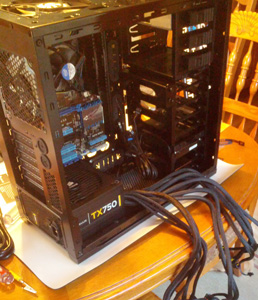
My new rigA little over a month ago, the following article appeared in my Google Reader: “Build the Best PC for Your Buck“. You’re probably thinking, “Who cares, and why would you want to build a PC? Tablets and Macs are all the rage these days.”
Well, I think tablets are luxury items, and I like more control over the features and specs in my machines than a Mac offers. So after having gone 7 years since my last PC build, I figured it was time to jump in.

The hardest part of every PC build I’ve ever done is getting started. Once you get outside of the processor space, the component choices are overwhelming. Trying to choose between motherboards, RAM, power supplies, cases and video cards can take an over thinking person like me weeks to sift through. Luckily, the above article gave me a great head start and considerably narrowed the field down. Here’s what I ended up buying, with the component price (prior to tax and shipping):

Processor Intel Core i5-3570K $199.99
Motherboard ASUS P8Z77-V LX $124.99
RAM Corsair Vengeance 8GB DDR3 SDRAM (4GB x 2) $54.99
Video Card EVGA GeForce GTX 660 (Superclocked) $199.99
SSD Samsung 840 Series 250GB SSD $159.99
Hard Drive Seagate Barracuda 2TB Internal HD $89.99
Optical Drive LG Blu-ray Disc Combo $44.99
Case NZXT Phantom 410 $99.99
Power Supply Corsair TX CMPSU-750TX 750W $99.99
Operating System Windows 7 Professional $139.99
Total Component Cost $1,214.90

I’ve had the machine running for just over a week, and for just over $1,200, I have one screaming machine. It goes from power on to usable in about 15 seconds and never seems to break a sweat with anything I’ve thrown at it over the last week.

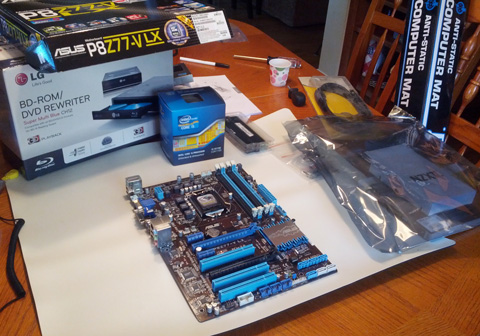
Assembling the motherboard

Here are a few notes and recommendations should you decide to embark on your own build project:

  1. I didn’t buy a keyboard, mouse or monitor. I just reused ones I had from the old machine. Unless you’re still using a 17″ monitor, I’d recommend reusing your old keyboard, mouse and monitor in order to save a couple hundred bucks.
  2. I couldn’t justify the extra $100 for an i7 processor. Sure it would have been faster, but for my computing and gaming needs, I wouldn’t have noticed it.
  3. I went with a middle of the road motherboard and saved about $50 forgoing the wireless connect module, which isn’t an issue for me since my house is wired.
  4. Looking back on things, I probably should have went for 16GB RAM, but that’s an upgrade I can pursue later should I need it.
  5. The video card was complete overkill, I ran the machine for a week using the motherboard’s built-in video and didn’t have any problems. I don’t game enough to justify the expense, but boy does it look good when playing Bioshock. By the way, if you get this card, make sure to get at least a mid-tower sized case, you’ll need the room for the card.
  6. The Solid State Drive is the crown jewel of the system. Every computer I build/buy from here on out will have an SSD. Sure, the cost per gigabyte isn’t nearly as good as an internal hard drive, but considering I go from power on to fully operational in 15 seconds, the extra expense is totally worth it. Turn-off/shutdown is equally as fast.
  7. The hard drive was unnecessary as well, but $89 for 2TB of storage? I couldn’t pass it up.
  8. I could have settled for a straight DVD drive, but I figured I should splurge and spend the extra $30 for Blu-ray, just in case any future games, programs or storage discs use that format.
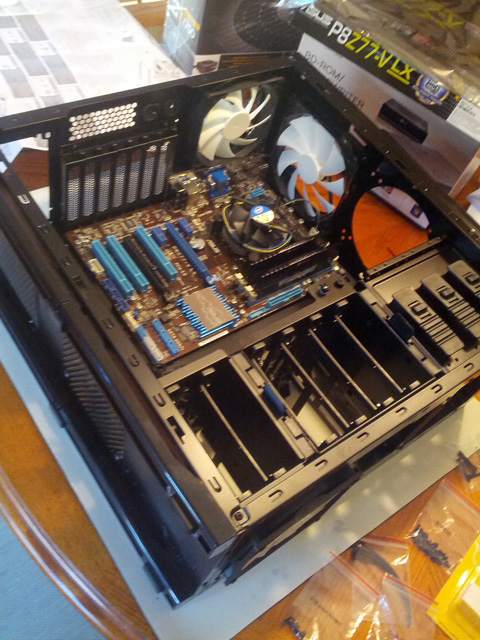
  9. A look inside the caseThe case is awesome and just looks cool. I really like all the open spots and fans that keep everything running cool, and there’s plenty of space inside to work with when installing components. I also like the idea that the power supply is placed at the bottom of the case, which helps to keep it a bit cooler and keeps the fan noise down.

  10. Ah, the operating system. A friend of mine told me that I should get Windows 8, but I couldn’t bring myself to do it. I need a machine that I can do work with, and I don’t have the patience to fool around with a new operating system. Plus, I’ve heard that Windows 8 works best with a touchscreen interface, so I’m waiting to take the Windows 8 plunge until I get a touchscreen monitor.

Overall, I’m really pleased, and I’m really thankful for the folks at Maximum PC for simplifying the component selection process. If the lifetime of my last machine is any indication, I suspect that I’ll be using this rig for the next 7-10 years.

Hi, my name’s Gregg, and I’m a Google Reader addict

How do I know I have a problem?

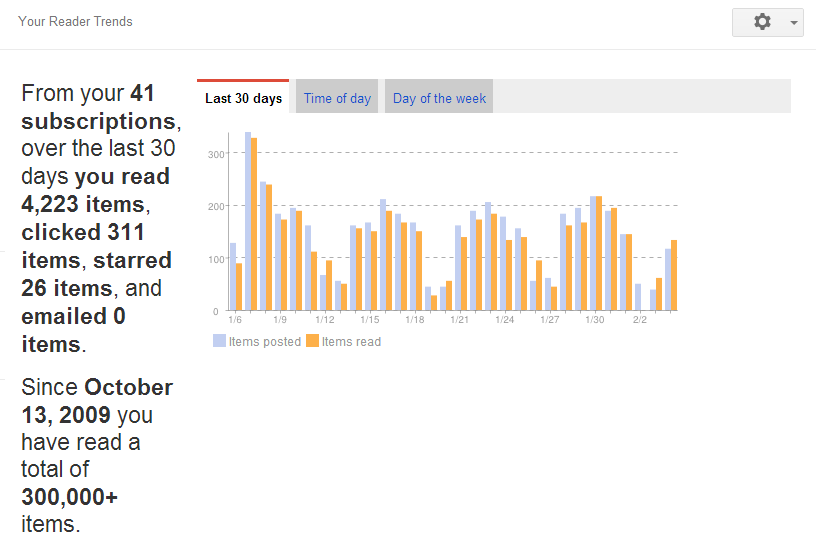
When I opened Google Reader this evening, it said that “Since October 15, 2009 you have read a total of 300,000+ items.” 300,000!!!!!!

I was introduced to Google Reader about five years ago. It’s what’s known as a feed reader. It allows you to subscribe to RSS feeds from websites and blogs so that every time a website publishes new content, it shows up in your feed reader. It’s a way more efficient way to get new content from websites since it is delivered to you instead of you having to check the website regularly. If you set it up properly, it’s like having your own personal newspaper where you get only the news that matters to you.

However, you need to be careful, because it can become an addiction. Once you realize how many websites have RSS feeds, you feel the urge to start subscribing to all of them. At my peak, I was subscribed to over 100 feeds and was getting up to 500 new articles, per day!

Now, Google Reader does have some tools to help you sift through articles quickly, like using the ‘j’ key or the space bar to quickly skip articles, or just marking certain feeds, or all of your articles, as read. But even just skimming through 500 articles takes a lot of time, and it’s stressful. It’s like working at the post office, no matter how many articles you clear, you know that more are on the way. Plus, I never liked marking lots of articles read because it made me feel like I would miss something.

After a while, I recognized I had a problem and was spending too much time with Google Reader, I decided it was time to cut back. I started culling unnecessary feeds and got my daily article count down to about 350 a couple of years ago. Then at the beginning of 2012, I felt more cuts were needed and got my daily count down to 200, which I’ve found is about the upper limit of what I can manage on a daily basis. If the number gets too far about 200, I find it takes too much time and effort to sort through.

Here is a snapshot of my reading trends from a few days ago. It shows that the average article count is about 200, although there are days where it can spike to 300. These usually indicate a special event, in this case the Consumer Electronics Show. I guess that’s the price of following tech blogs like Gizmodo, Mashable and GigaOM.

Google Reader Trends

It felt good over the last year to get my addiction under control, but I still have more to do. I’d like to cut more this year and get the daily article count to between 125 and 150.

It’s a balance. While I like reading lots of different feeds, there comes a time when you have to cut down to the ones that really matter, and I’ve reached that point.

In the end, I wonder if my experience follows most Google Reader users. Sign up, subscribe to a few feeds, discover how awesome it is, then subscribe to way too many feeds, and finally realize how overwhelming it is and start the gradual process of cutting back.

Either way, it feels good to manage the addiction. I’m just hoping I don’t fall off the wagon….

Why I’m not an Apple fan

It will come as no shock to my family and those who know me that I’m not a fan of Apple. It’s not that I don’t like their products. They’re great. Apple products are the best designed products on the market. I dislike them because of their business practices.

I don’t like that Apple insists on owning the end-to-end experience. While they’ve created the best hardware, their software can leave a lot to be desired. Sure they make some great applications. But for every one good one, there’s an Apple Maps. And don’t even get me started on iTunes.They think they can create the best software to go with the hardware, and in the process, they lock out potentially great alternatives. It handicaps how good the Apple experience could be.

I don’t like that they try to lock you in, for life. Once you pick up an Apple product, you get sucked into their environment. You can resist, but the alternatives are always way more painful than what Apple provides. In the end, it makes it difficult to ever switch away from Apple’s products, locking you in. If Apple should fall behind or muff a new product design, you are stuck with their poor choices.

I don’t like that they treat me like a child. Why does Apple always feel the need to protect me from myself? They ruthlessly censor curate the app store to keep out what they feel are unwanted apps. For years they prevented multi-tasking for fear I would run too many apps at once and kill battery life. They make all the hardware choices and limit the ability for me to customize the product. It keeps me from being able to tinker and experiment, much like the rules we give our kids to protect them from hurting themselves.

I don’t like that Apple has an arrogant attitude. Why does Apple insist on using its own connector when every other vendor uses micro-USB, allowing me to mix and match chargers in my house? When the iPhone gets poor reception, why is the answer I’m holding it wrong? Why does Apple insist on using a different SIM card size, the nano SIM, than every other phone? I would expect an industry leader like Apple to have some amount of arrogance, but they’ve taken it to a whole new level.

I don’t like that Apple charges a premium for their devices. Whether it’s a laptop or a phone, Apple charges almost 2x for an equivalent competing product. Case in point, my daughter’s iPhone 5 was twice the cost of my son’s Nexus 4, which is every bit as good as the iPhone if not better. I had a similar experience buying a laptop for my daughter two years ago. The Windows laptop I bought was equivalent to the Apple device in every way except styling and price, which was 50% less. To this day, I’m still amazed at the marketing job that Apple has done and how it is able to continue to charge the “Apple tax” for its products.

For the longest time, I thought I was the only one who felt this way. Lately, though, I’ve noticed more people are starting to question Apple’s practices. Others are even considering switching away, which does not bode well for Apple’s future.

If Apple wants to grow and eat into Android’s popularity, they will have to open up and change their business practices. Until they do, I’m staying away and sticking with my Android and Windows based devices.

The Great Beard Experiment of 2012-2013

I’ve never had a beard or mustache, but I usually let my facial hair grow out a bit over the holidays. I usually start a week or so before Christmas and shave it off after New Year’s. There’s no rhyme or reason as to why, I guess it’s just a way of mixing things up a bit.

This year, I started a bit earlier during the second week of December and still have it. I’ve kept up with maintenance and trimming, but this is by far the longest I’ve let my facial hair grow.

I thought it would fun to post a pic before it comes off, which is happening this weekend. I’ve gotten over the itchies and all the other nonsense of having a beard, but it’s not for me. Plus, keeping up with the trimming and maintenance is nearly as much work as shaving everyday, so I don’t get the point of keeping it.

Fear the Beard!So what do you think, should it stay or should it go?
Can you work from home?

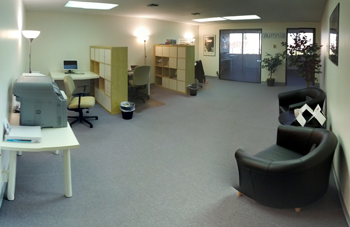
The Aumnia OfficeTelecommuting and remote working options continue to grow in popularity. It begs the question, can you be effective working from home?

My answer – it depends.

I spent the first 14 years of my career working in an office. I never worked from home and was opposed to having people in my group do it. Back in that time (prior to 2005), the lack of broadband connectivity and communication tools made it difficult for people to get their jobs done when they weren’t in the office. In my mind, working from home wasn’t an option.

When I started my own company in 2006, working in an office was a luxury we couldn’t afford. I was forced to work from home to get things started.

At first, working from home felt like liberation. There was no time lost commuting, getting lunch was a simple walk to the kitchen, and I was never late for dinner. On the other hand, the distractions were numerous. Home projects that waited until after work or the weekend called for immediate attention, family members interrupted with non-work related questions, and household noise (especially from the kids during the summer) made concentrating difficult.

It took me the better part of two years to figure out how to be productive working from home. Here are some lessons I learned:

  • Establish a work schedule and stick to it. Don’t fall into the trap of working strange hours. A regular work schedule helps with the discipline of when you are “at work” and when you are “at home”.
  • Let family members know your work schedule. Set times with your family when you are “at work” and when you are “at home”. I’m aware of someone who went as far as to close his door when he was working and have family members call him on the phone during “work hours” to talk. I’m not suggesting it needs to be this radical, but family members need to respect work time vs home time.
  • Dedicate a place in the house for working. If you plan to work at the kitchen table where you eat, it won’t work. Pick a room, or even a desk, that is only used for work. A dedicated work space will put (and help keep) you in a working frame of mind.
  • Separate home computer from work computer. There are too many distractions on your home computer that can interfere with work – think games, browser favorites, being logged into social networking sites, chat programs, etc. A dedicated work computer reinforces the notion that you’re working when you’re on it.
  • Have a reliable, broadband internet connection. I would think that no further explanation is needed here.
  • Dress for work. Just because you’re working from home doesn’t mean staying in your underwear all day. Dress as if you were going to the office – it’s a psychological thing.

Unfortunately, I’ve learned that these work from home tips aren’t enough me. I started working in an office again last year, and my productivity has risen – both at work and at home.

While I can make telecommuting work, it’s not the best situation for me. I am most productive when I can physically separate work from home. I know other people have figured out how to be more productive when working from home, which is why I say “it depends” when someone asks me the question. It’s a decision you have to make based on your situation and work habits.

Maybe someday I’ll take another crack at working from home, but for now I’m going to stick with what’s working.

My disdain for Apple renewed – a father’s Christmas story

At the urging (and begging) of my two oldest daughters, I gave in and purchased an iPhone 5 and iPod Touch 5 as Christmas gifts. Before I go off on a rant, I’d like to state for the record that Apple makes a sweet piece of kit. Both devices look absolutely gorgeous.

iTunes - not for meThe software on the other hand, well it just plain sucks.

After getting the devices setup, which is a painless process, I set out to sync up their devices with our home music library. The shine wore off as I waded into iTunes, which is an unbelievably horrid piece of software. It reminded me why I had avoided Apple products for the longest time despite their beauty. I didn’t want to get trapped into their software black hole.

For all the praise people heap upon Apple, I can’t believe they tolerate the abomination that is iTunes. If people knew what existed outside of the Apple reality distortion field, there would surely be a revolt. Fortunately, since Apple keeps their users quarantined and chained to their software, they have no idea how bad they have it. A few of the things that I noticed:

  1. It is painfully slow. I don’t have a huge music library (~3,000 songs), but it took 3-4 hours for iTunes to process the library. I found this very strange since it was only indexing songs, it wasn’t copying them to local storage or anything. Most other Windows-based software can index my library in a matter of minutes, as half hour at most.
  2. Syncing options are limited. How can you not allow syncing on a song by song basis? Really?
  3. iTunes does not auto-discover new music. Once setup, if you add new music to your library, you need to reload the library. While it doesn’t take as long as the initial load, it still takes a long time to page through the library.

I could continue to go on, but I think you get the point. I’d like to believe that the issues are the result of me doing something wrong, but Google searches lead me to the conclusion that these are limitations that have not been addressed in the ten years that the iPod has been around.

The iTunes experience is so bad that my daughters aren’t even using their new Apple devices for music, they’ve sticking with their Zune HD devices. People may ridicule Microsoft’s Zune devices, but the Zune HD was, and still is, a great music player.

Anyway, here are a couple of suggestions for improving the iTunes experience. I doubt anyone at Apple will listen, but if they did, I just might consider getting one for myself:

  • Let me use the device as USB storage. I’d like to be able to plug the device into a computer and drag-and-drop directly to the device without having to go through a single piece of software.
  • Allow other programs/apps to sync music. Apple’s software shouldn’t be the only choice. Developers should be allowed to create better options for syncing music libraries.
  • Provide a music subscription option. Surely Apple can convince the record labels to permit music subscriptions. Those familiar with Zune Pass know what I’m talking about – it rocks, literally!
  • Give better syncing options. At a minimum, the ability to sync on a per song basis.

If anyone has any tips on how to get more from iTunes, I’m all ears. Something tells me the Zune HDs won’t last forever, and that sooner or later I’ll be forced into using iTunes, whether I like it or not.


A slow start

OK, so the blog has gotten off to a slow start. My intention was to post at least once a week, but then life happened. Well, more specifically, a master bathroom remodel happened.

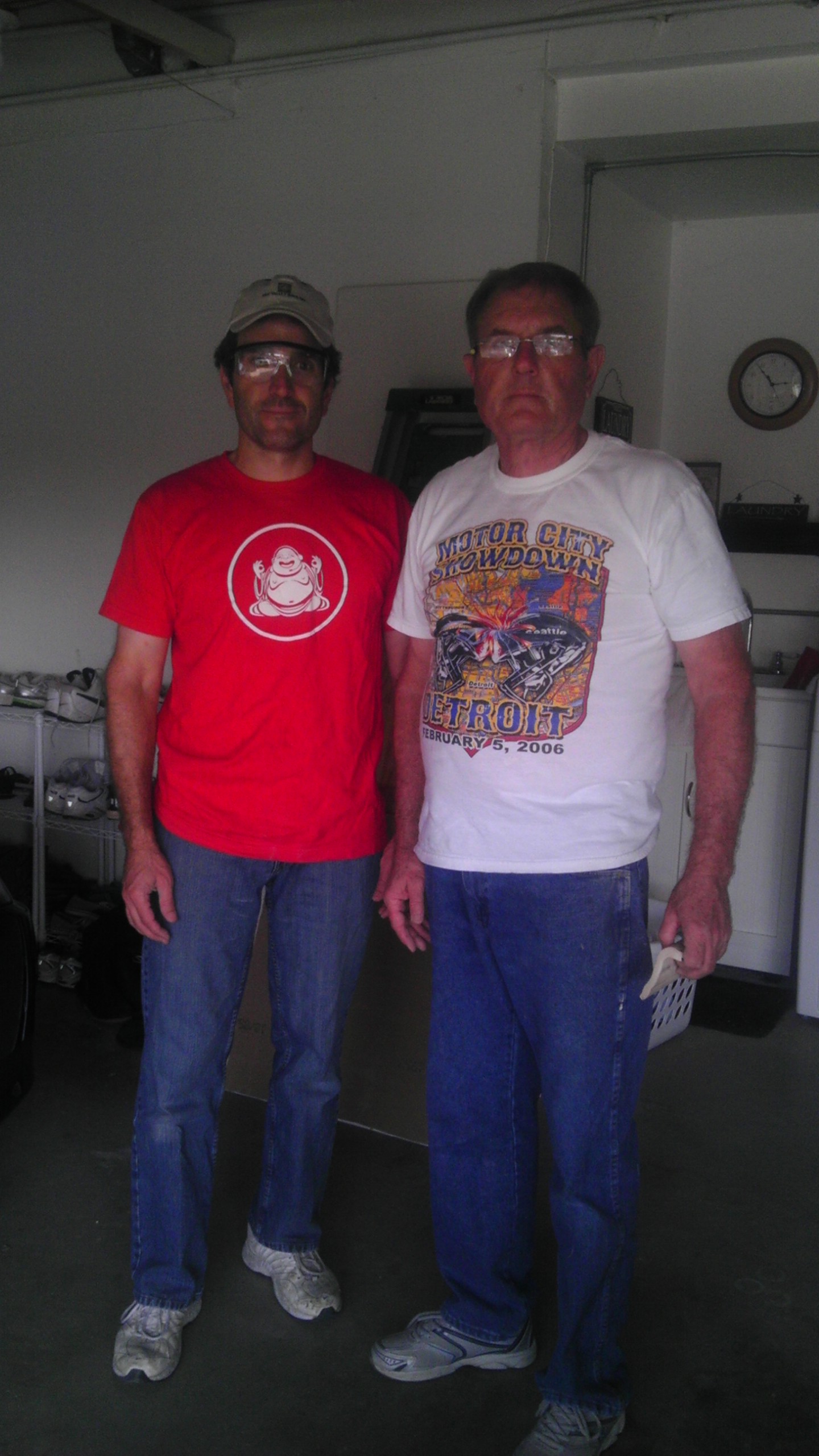
Weekend project warriorsMy parents came out over Thanksgiving, and my dad and I set out to remodel our master bathroom over a three week time period. At least that was the plan.

We started off strong. The demo went well, but then the inevitable home remodel items started cropping up. It didn’t help that we got delayed by a power outage one evening, and I found out that tile and tile designs have different degrees of difficulty. My suggestion to Home Depot is to start putting green circles, blue squares and black diamonds on their tile to indicate the difficulty of installation. To put it mildly, I’m a green circle level tiler, and I picked out the double black version.

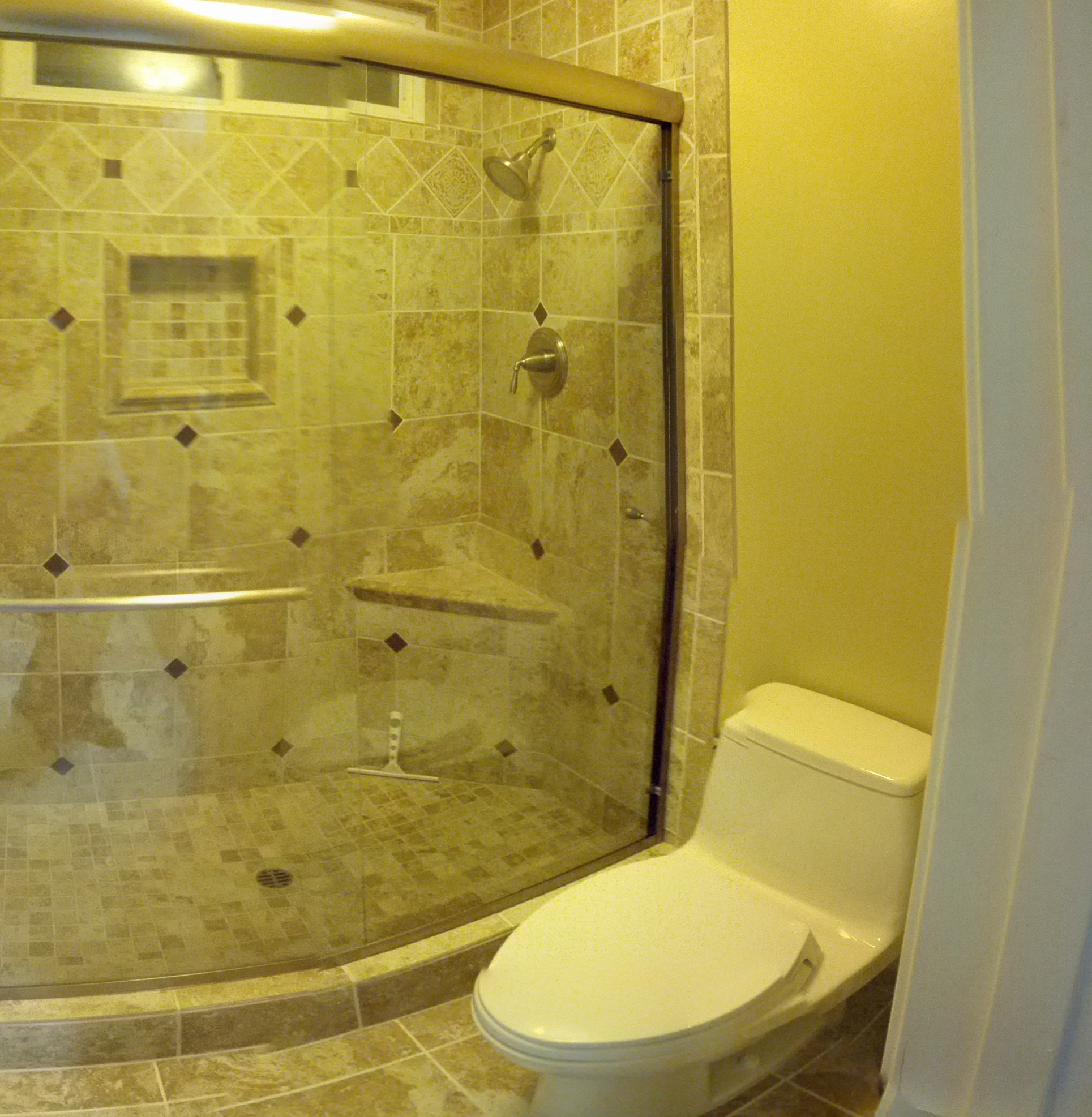
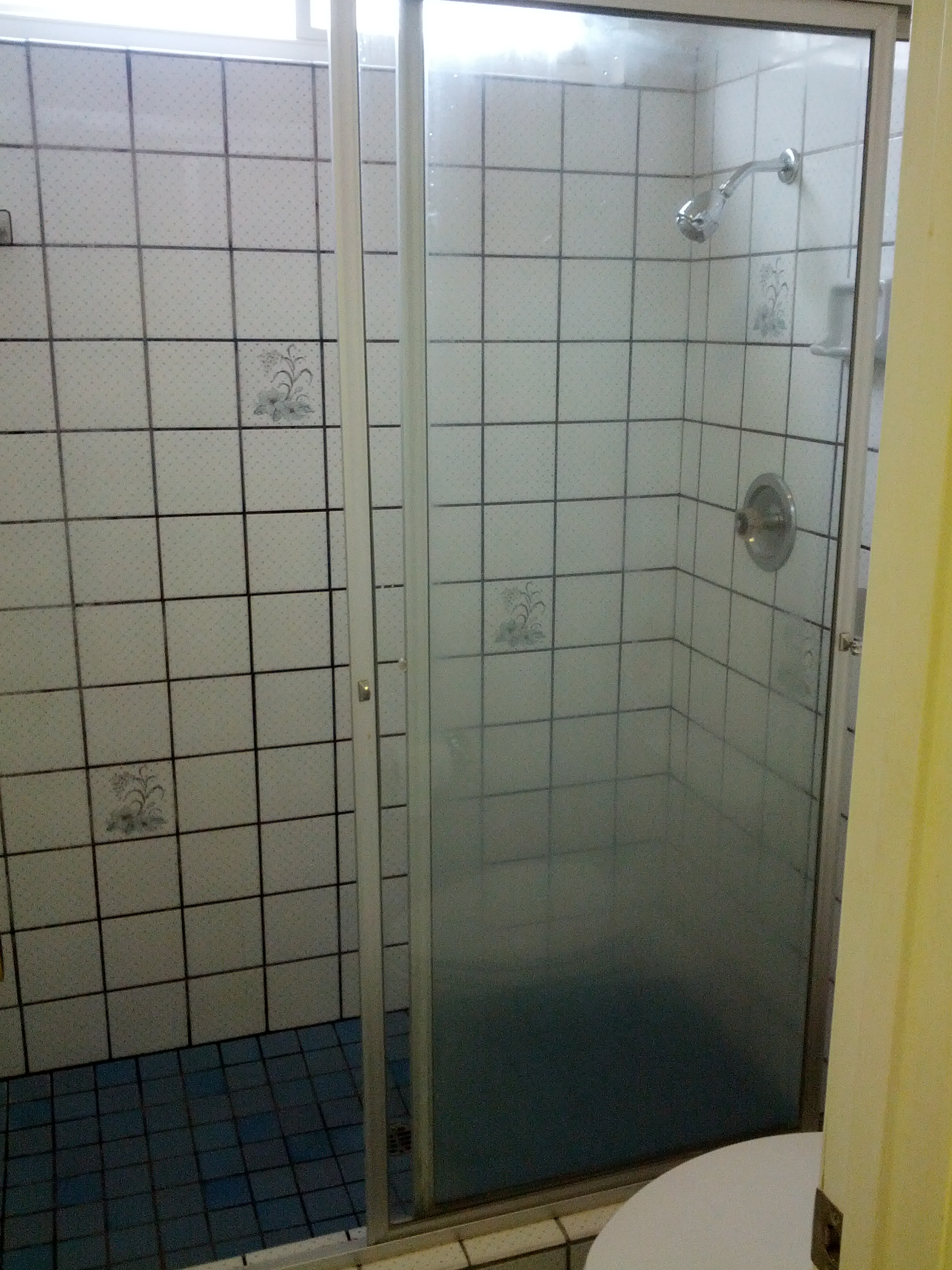
After a few weeks of hard work and a number of long nights, my dad and I succeeded in transforming the bathroom into something completely amazing. There is no way I could have done it on my own, and I am forever indebted to my dad for his help (truth be told, I’ll just add it to the pile I already owe). He is incredible when it comes to home remodel projects. It seems like there is no job he can’t do, from tiling to plumbing to electrical, even if sometimes it’s the first time he’s done a particular task. In the end, it all turned out good, and the pictures below are the proof.

The Before Picture                 The Bathroom - After
Before shot on the left, after on the right

Anyway, my goal going forward is to get into a regular rhythm of posting. I have a backlog of things I want to write about. Hopefully, I’ll be able to get to them before they go stale!

Why?

For my first post, I figured I should answer the question everyone is (or should be) asking about the website. Why?

I could point to many reasons I decided to create it, one being it’s something I’ve wanted to do for a long time. However, there are the three better reasons why I finally decided to jump into the deep end of the internet pool.

  1. A life journal
    I have an account on all of the major social networks, so I could use one of those for my journal. I’m just not that comfortable “sharing” on them. It could be paranoia, insecurity, or a combination of the two, but it concerns me that whatever you share on these platforms belongs to them. For example, Facebook continually takes more and more of your private posts and information and makes it public. People complain, but based on their terms of service, it’s well within their rights. They own the data you put on their network.

    Well, with my own website, I can comfortably speak and share knowing who defined the terms of service for the site – me!

    My website is meant to act as a place where I can share and record my thoughts and life events for me to look back on. It will also serve as a legacy to current and future generations who might wonder, “what was he thinking?” Well, now they’ll know.

  2. Discover and establish a voice
    Running my own business has made me more aware of how important communicating and networking is. I follow a number of people through their websites and blogs, many of whom I’ve never met. However, I feel like I know them because of the thoughts they share. I’d like to discover and establish a voice so people can connect and network with me, even if we’ve never met.
  3. My digital playground
    Deep down, I’m a software enthusiast (or call me a software geek if you prefer). I like to tinker with software, and I’ve become particularly fascinated with web technologies. Having my own website will give me an outlet to experiment with different technologies, learn more about web programming, and put this knowledge into practice. I know the website doesn’t look like much now, but I’m hopeful that it will become more visually appealing and engaging over time.

So thanks for stopping by – I’m glad you did. Feel free to drop me a line and share your thoughts on any of my posts. I’d love to hear from you!