Earlier today, I had the privilege of judging the Capstone Senior Projects for the ECE 189 A/B class at UCSB. A few months ago, my good friend and professor for the class, Dr. John Johnson, asked me if I would like to participate as a judge, and I immediately said yes. It was an amazing opportunity to get an in depth look at what his students had been working on for the past year.
My first observation is that teaching methods have changed a lot in the 25 years since I graduated from RPI with my electrical engineering degree. The most I had ever built during my undergraduate experience were a few bread board circuits in the lab, and I had the chance to write some assembly code for a 68030 Motorola microprocessor.
The 7 groups in Dr. Johnson’s class were tasked with selecting a project, specifying the components, laying out a printed circuit board (PCB), sending it out for manufacturing, powering up and debugging the board, and integrating the hardware with software to create a functional product.
A detailed description of all seven projects can be found on the class page for ECE 189 by clicking here, but here is a brief description of each of the projects:
Track Mate – a GPS tracking and MP3 players for athletes
Smart Cart – an interactive display for shopping carts
Smart Guitar – a device that picks up analog signals from a guitar and displays the data as music notes
AFRObot – an autonomous robot that follows and traces existing lines with high precision
Swell Alert – a Wi-fi connected alarm clock that uses data from public sources to monitor surf conditions
M.A.D. Dog – a robot that maps office spaces before going on security patrol
Mu.S.E. – a music player that automatically selects music based on the environment
Each of the groups had chosen very complex projects, and it was amazing to see the progress they were able to make in such a short amount of time. Each group had two 10-week sessions to build the hardware and software, with a 10-week break between sessions during which their printed circuit boards were manufactured and assembled. Each group was able to demonstrate a piece of working hardware, with some groups making more progress than others. In fact, a couple of the groups had projects that were close to being finished products.
The groups were also well prepared, had clear and polished project presentations, and handled questions from the audience effortlessly. The presentations were not only a reflection of the effort the students put into their projects but also of the effort Dr. Johnson, his Teaching Assistant, and the rest of the support staff in UCSB’s ECE department put into helping the students. To say I walked away impressed is an understatement.
Amongst all of this, myself and two others had to judge these projects and select a winner, which was not an easy task. In the end, it came down to two projects that separated themselves from the pack – the AFRObot and Swell Alert. In the end, there could only be one winner, and after quite a bit of debate, we selected Swell Alert.
I’d like to congratulate the Swell Alert team, as well as the AFRObot and other Capstone project teams for a job well done. And I’d like to personally thank my friend John for asking me to be a judge and hope that I’ll have an opportunity to do it again.
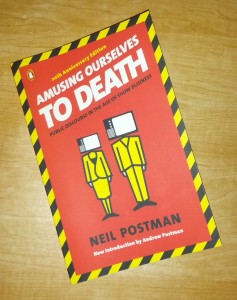
The first thing to note about the book is that it is a nonfiction work discussing how technology is changing the way society functions, and not necessarily in a positive way. The second, and more amazing, thing to note is that the book was written in 1985, nearly 30 years ago. Why is this amazing? The book is just as relevant now as it was in 1985, if not more so.
Orwell warns that we will be overcome by an externally imposed oppression. But in Huxley’s vision, no Big Brother is required to deprive people of their autonomy, maturity and history. As he saw it, people will come to love their oppression, to adore the technologies that undo their capacities to think.
Postman continues by expounding on Huxley’s fears, that he feared “those who would give us so much that we would be reduced to passivity and egoism” and “the truth would be drowned in a sea of irrelevance.” He wraps up with this powerful statement:
In short, Orwell feared that what we hate will ruin us. Huxley feared that what we love will ruin us.
In essence, the point of Postman’s book is to show that Huxley’s dystopian view of the future has won out over Orwell’s. And while the book starts out a bit dry as he reviews a history of technology evolution and its impact on public discourse, it is a necessary build up to show how the technology of 1985 was enabling Huxley’s view of the future. What is more amazing, he portends how technology will continue to erode society and culture, and when one looks at our infatuation with the internet, social media, smartphones, and other technology diversions, it’s hard to argue Postman’s point that we’re getting closer to living in a Brave New World rather than 1984.
I must admit that at times, I found the book disconcerting as it left me longing for the past. A time where technology wasn’t prevalent. Where news in one’s community mattered more than news on the opposite side of the world. Where politicians were elected on the basis of their views and knowledge, not on their ability to produce 3 second television sound bytes. Where people engaged in deep, meaningful, rich conversations with one another, not in 140 character messages.
However, once I realized that technology is so integrated and woven into the fabric of our society that there is no going back, the power of Postman’s work became apparent. He does a magnificent job describing how the prevalence of technology affects human psychology and interaction. With that knowledge, I began to consider how people are using technology to influence others (including me), how to recognize it, and how to use it. In other words, we shouldn’t fear technology, but rather embrace it, understand its effects, and learn how to use it as a tool rather than letting it use us.
My recommendation, Amusing Ourselves to Death is a must read book. It will open your eyes to how technology has changed society and how it continues to do so, in ways that aren’t necessarily positive. It will make you think, particularly how you interact with all of these amazing inventions, gadgets, and diversions that we’re provided today. It also encouraged me to pick up a copy of Brave New World (which I’ll review later), and it has me interested in picking up Postman’s follow-up book to Amusing Ourselves to Death entitled, Technopoly: The Surrender of Culture to Technology.
I created an account. I friended some people. I accepted friend requests. I joined some groups. I “liked” some company pages. I created a couple of company pages and managed them. I checked in on my news feed once a day or so.
In the end, it just didn’t work for me. For a while I couldn’t figure out why, but then I realized what my beef was with Facebook. I’m not a user, I’m the product.
Facebook and Mark Zuckerberg report to their investors and shareholders, not to me. They’re obligated to provide their owners with a return on their investment. So long as that’s true, Facebook will be under pressure to make money. (Shocking, right?)
In case you haven’t figured this out, Facebook makes money from advertisers, not by creating services for you and me. Yes, you and me are an integral part of the Facebook product since we and our data are how Facebook makes its money – by packaging us and selling us to the highest bidder. So long as Facebook makes money through advertisers, they will continue to exploit their user base by encouraging over sharing through more and more relaxed and/or confusing privacy controls and settings. Basically, I don’t trust Facebook because their business model is based on making money by exploiting users and their data.
For what it’s worth, just because I have an issue with Facebook doesn’t mean I think Mark Zuckerberg is a bad person. In fact, I believe he has the best intentions in his heart, but his board and investors are directing him to chase money rather than serving users and making investments in long-term technologies. A look at some recent Facebook decisions around their mobile strategy are just one example.
Facebook’s initial strategy for mobile was to develop hybrid apps based on HTML5, an emerging web technology that would allow for universal apps across operating systems – iOS, Android, Windows Phone, and BlackBerry. However, under the guise of performance, Facebook moved to proprietary apps. To me, the real reason for the change was to create a proprietary system that would allow them to isolate users, and I am not alone in my thinking. In order to chase a short-term gain in users and revenue, Facebook gave up the chance to be a technology leader.
Because Facebook is not interested in the long-term, I don’t trust them with my data, or with my most valuable asset – my time. For a couple of years, I managed brand pages on Facebook, investing time and effort trying to connect with potential users of my service. Facebook made it an inviting option by allowing you to set up a brand page for free and then allowing you to connect with users who “liked” your page. However, even those rules changed when Facebook realized it could wring more money out of companies by making them pay to promote their posts.
This focus on the short-term is why I feel that Facebook will not survive the long haul. Sure, they’ve created a useful service, but it is not an essential internet service, and their desire to chase short-term dollars over long-term technology leadership will leave them susceptible to what I like to call the “night club effect“.
So while there’s no doubt that Facebook has been the biggest success of the social networking space, I’ve given up on the service and don’t miss it. I even see my kids spending less and less time there, which doesn’t bode well for Facebook since teenagers tend to be the leading indicators of the next big social networking site (which is Twitter these days, by the way). I’ve even given up on it for the brands I manage. Maybe I’m missing something by not being there, but it sure doesn’t feel like it, and I have no plans to go back anytime soon.
Even though I’m not the most prolific reader, I really enjoy it. Especially when you get into a book that you just can’t put down.
I had gotten away from reading regularly the past couple of years with only occasional reading of business books and other non-fiction. Around the middle of last year, I decided it was time to start broadening my horizons and delving into some science fiction based upon some posts I had seen on Brad Feld’s blog. Basically, it dawned on me that reading science fiction might provide an indication of coming technology advancements.
I’ll admit that the book takes a bit to get going, especially if you have an engineering background. Hertling uses the first part of the book to provide some technical background to the subject of artificial intelligence and how engineering and technical decisions are made in a corporate environment. It helps to make the rest of the book more accessible to non-technical types, and it hits a little too close to home if you have an engineering background, particularly in software.
The second half of the book is a fast-paced action thriller which I had a hard time putting down. In fact, it probably took me the better part of a week to pour through the first half of the book and one evening of reading to finish the second half. I stayed up a little later than normal one night polishing it off.
Some of the technology in the book is a little far-fetched, at least today, but a lot of it sounds and feels very plausible. In fact, it’s almost scary. If you read the book and are interested in how the author feels about his technology “inventions”, check out this post on his blog.
Once I finished Avogadro Corp, I had to pick up the follow-on, A.I Apocalypse. A.I Apocalypse gets right to the action and is pretty much non-stop from start to finish. I polished it off quickly in a couple of evening sittings. It’s a sequel to Avogadro Corp and is set about 10 years beyond the conclusion of Avogadro Corp, which is set in near present times. Hertling does a great job introducing a new plotline and characters into A.I. Apocalypse while masterfully weaving in elements and characters from the first book. The other thing I like about A.I. is that it makes bigger leaps in technology prediction that are for the most part very plausible. In fact, after reading it, I could easily visualize how the technology progression could happen and the impact it would have on my current business.
My recommendation, Avogadro Corp and A.I. Apocalypse are must read books. They will open your eyes and provide a good sense of where technology is heading. Sure there are some items that aren’t entirely plausible, but my gut tells me that 80-90% of the technology described in the books will come to fruition within the next 10-15 years, if not sooner.
I’e become a fan of Hertling’s work, and I’m looking forward to the third installment in the series, The Last Firewall.
Despite a 40% drop in stock price from $700 to $400, Apple continues to roll. The company generated $43.6 billion in revenue this past quarter, $9.5 billion in profit and added another $12.5 billion to their hoard of cash, raising their cash balance to $145 billion. With these kinds of monstrous numbers, the company should be receiving nothing but praise and accolades. So why is Apple not receiving any love these days?
Stale products
I can’t count how many times iPhone users have asked me recently about my Galaxy Nexus, which is almost two years old at this point. One particular example stands out in my mind. When I was car shopping this past January, a junior salesman at the dealership was very curious about my phone and began asking me a lot of questions about it. When I asked him why he was interested, he said he was getting tired of his iPhone and was ready for something new. He didn’t like it that everybody seemed to have one, and he felt as though the design was getting old. Someone in their early 20’s who is not technically inclined complaining about a stale design is an indication of a larger issue in my mind. It would appear that Apple’s one design philosophy, which was such a powerful tool for adoption, is now having the opposite effect. People are experiencing gadget envy with their competitors.
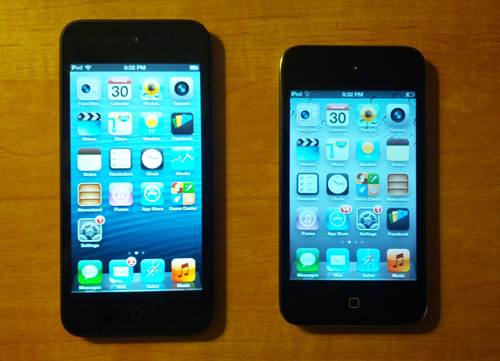
Taking a look at the differences, or lack thereof, between the iPhone 4S and iPhone 5 is a good indication of how the design has grown stagnant. Outside of an extra row of icons on the screen, the devices really don’t appear to be that much different.
A recent sales analysis shows that the transition from the iPhone 4S to the iPhone 5 has been much slower than the previous generation (see this article at AllThingsD for a complete analysis). Depending on how you look at it, it either means that Apple is doing a good job servicing the lower end of the market with the iPhone 4S, or that there’s not much incentive to upgrade. If it’s the latter, this could be the leading signs of a fundamental problem since margins on newer products are much better than margins on older ones. Personally, I see it as the latter, meaning Apple needs to step up the innovation.
Arrogance and Elitism When senior Apple executives fail to take their competition seriously (read Apple marketing chief Phil Schiller’s comments to the Wall Street Journal ripping Samsung and Android here), they are either out of touch or arrogant. Based on anecdotes from others in the industry, I believe arrogance is the answer. Apple still believes they are far and away best, when the reality is that their lead has eroded, and in some areas they have been surpassed by Android. By trying to belittle the competition, Apple is taking their user base for granted and assuming that they won’t look around at alternatives. While they may not want to admit it, Apple is one poor product launch from falling significantly behind the ever advancing Android juggernaut.
There’s also the issue of elitism. Whether it wants to or not, Apple is crafting an image of itself as a product for the 1% by forcing obsolescence and mandatory upgrades. While product cycles are a fact of life in the tech sector, Apple is one of the few tech companies who openly flouts it. Unfortunately, it’s starting to create a backlash, even among Apple loyalists as this article points out (if you have time, peruse the comments to get a more in depth reaction to Apple’s tactics).
As a PC user, I find it strange that an Apple user is forced to upgrade their machine after four years when I’ve been using numerous PC’s in my house, some that are over 10 years old. I’ve been able to keep machines modern and operational by cost-effectively upgrading accessories, monitors, memory and video cards. Apple on the other hand, recommends throwing out the old and buying new. While this may be a good strategy for the elite, it doesn’t translate well to the lower ends of the market.
“Are you incompetent, bureaucratic, or out of touch?”
This quote from a Michael Mace article recapping the Apple Maps debacle summarizes things well (by the way, Michael is one of my favorite tech bloggers – well worth following). In the article, he simply asks the question of “How in the world did Apple let this happen in the first place?”. As a company that is supposed to amaze and delight its users, releasing half-baked products does not instill confidence in its users and removes some of the luster from its well polished marketing machine. And while Apple did eventually try to make amends and apologize for the quality of Apple Maps, it begs the question if this is an isolated incident or an indicator of how product launches will be handled moving forward. I’m not a loyal Apple user, but I’m also aware that there were some glitches in the release of iOS 6 that seemed to be fairly basic in nature regarding security and Wi-fi connectivity.
So let’s face facts – Apple isn’t going anywhere in the short-term, meaning the next 3-5 years. They have way too much cash in the bank to become irrelevant anytime soon. In fact, they will continue to generate significant sums of cash, and their cash stocks will only go down based upon how much they chose to pay out to their investors. Given the expected growth in tablets and phones, I expect more record breaking sales from Apple throughout 2013 and 2014. The question is how long they can maintain their momentum. The consumer market is fickle (just ask Sony), and while Apple will always have their core group of loyalists, the so-called fanboi’s, the general consumer market is not nearly as loyal. If the market perceives that Apple is falling behind, has lost its customer focus, and has become too arrogant, they will punish Apple not only in the stock market but in the one market that really counts – the marketplace.
So yes, the stock market may be punishing Apple over the short-term, but there are reasons for concern when you take a longer-term look at Apple’s prospects.
My favorite use for the credit card processing service Square is collecting my rebate from those silly rebate credit cards you get sent in the mail. In the “old” days, companies would mail you a check when you completed their rebate process. Now, they send out credit cards that contain your rebate.
For me, the cards are not as convenient as the checks. I either put them in a drawer and forget about them, or I spend them down to a couple of dollars and then have a hard time spending the balance. Most merchants are reluctant to break apart transactions into small amounts. Eventually, the fees eat up the balance.
This is where Square comes in. You can sign-up for a free account at http://squareup.com, they send you a free card swiping dongle, and you download their Register app from the App Store or Google Play.
For example, I recently got a $20 rebate check from Corsair for the power supply I purchased for my latest computer. Instead of carrying the card around and finding ways to use it, I loaded up the Register app on my phone, plugged in the dongle, logged into the account, and paid myself the $20. Sure, Square charges a flat card processing fee of 2.75%, so I lost $0.55, but I would have probably lost a lot more than that when the balance got down to a couple of dollars.
It’s awesome that credit card processing has become accessible for individuals. There are plenty of other ways to use Square for your personal use (think garage sales for example), but processing those pesky rebate cards has got to be my favorite.
As a recovering Google Reader addict, I’ve been doing pretty good this year keeping my habit under control. I’ve trimmed my feeds down to a reasonable level, and rarely does my daily article count exceed the 150 level. It’s been a refreshing change from the crushing weight of trying to keep up with 300+ articles a day, which is where I was at during the height of my addiction.
So, I’m not sure if it was surprise, anger, disappointment, relief, or a combination of all of the above that I felt when I opened my Google Reader the morning of March 13th. The message staring back at me said that Google Reader would no longer be available starting July 1st – it had become a victim of Google’s “spring cleaning” so they can pour more energy into fewer products.
Surprise My first reaction was “how could they kill Google Reader?” Google Reader is such an integral part of my daily routine, much like reading the morning newspaper, that I couldn’t imagine that it would go away. It took a few minutes for the shock and disbelief to pass.
Anger
Once the shock and disbelief passed, the next thought was “how could they do this to me?” Yes, I took it personally, until I realized I wasn’t alone. Scanning the articles in my soon to be discontinued Reader confirmed it. Op-eds like this one on Mashable popped up expressing their love for Reader, others expressed how critical it is to their job, while another neatly summarized the shock and disbelief I initially felt (this one’s my personal fave).
Disappointment
Knowing that others were in the same boat as me helped me move from anger to feelings of disappointment. After flipping through numerous articles, it was clear that this was not an early April Fool’s joke and that Google was serious. In fact, I held out hope for most of the day that perhaps Google would reconsider their decision based on the strong negative reaction until I saw this article on GigaOM. When the creator of Google Reader states that Reader was living on borrowed time, it’s pretty clear that the decision is final.
Relief
After coming to the realization that I would have to move on, a feeling of relief came over me. It was almost as if Google realized I had a Reader addiction and was coming to my aid to help cure it, for good. It has certainly diminished the importance of Reader in my daily routine, and now I’m ready to perform another culling of my subscriptions as the looming deadline approaches.
If there is good news in the announcement, it’s two things. First, Google does provide a method for you to export your feeds so you can take them to another service. Marketing Land has provided a list of 12 alternatives that could be used instead of Google Reader. Second, by providing a few months of notice, it will give the existing services a chance to improve (which Feedly has been doing a lot of lately), or it will allow another party to step up and fill the void.
Now I just need to decide if I’m going to slowly wind down my reading between now and July 1st, go cold turkey on July 1st, or transition my addiction to another service. For the time being, I’m going to continue using Reader and see if one of the existing services separates from the pack or if a new option presents itself between now and July 1st.
No matter the outcome, it will feel good to finally put my addiction behind me. Thank you Google.
It’s hard, really hard, being a Pitt basketball fan.
I’ve been following them for over thirty years, starting sometime back in 1981. ESPN was just starting to get into covering college basketball at the time, and I needed a team to follow. Given I lived in Pittsburgh and was a die-hard Pitt football fan (the seventies and early eighties were Pitt football’s glory days), it wasn’t hard to pick Pitt as my basketball team. Little did I know the crushing disappointments I was signing myself up for.
Believe it or not, recent times (since 2000) are the glory days for Pitt basketball, at least during my tenure as a fan. Pitt has been to the NCAA tournament in 11 of the past 12 years. They’ve made to four Sweet Sixteens, one Elite Eight, and have been one-and-done only twice, which includes this years whooping by Witchita State. They’ve been to the Big East tournament championship game 6 times, all from 2001-2007, and brought home two titles. They’ve also won 4 Big East regular season titles.
In the twenty years prior to 2000, Pitt had been to the NCAA tournament 8 times, never advancing to the Sweet Sixteen. They didn’t appear in any Big East championship games, and only won 2 Big East regular season titles. In fact, the years between 1990 and 2000 were particularly bleak, with only 3 post-season appearances – 2 NCAAs and 1 NIT.
So what’s the problem you ask? It’s the way in which Pitt’s season seems to end every year that has resulted in such crushing disappointments. In fact, it’s not hard to do a search and pull up video of most of Pitt’s March losses since they were all particularly painful in their own way.
As part of cleansing, and hope that this might change the luck for next year, here’s my compilation of the top 10 most crushing NCAA and Big East tournament losses Pitt has suffered in my 30 years as a fan.
#10 – 2006 Big East Championship, Pitt vs Syracuse
Pittsburgh had completed a somewhat pedestrian season by recent standards and entered the tournament as the #6 seed. They proceeded to defeat Louisville, rival West Virginia, and Villanova on their way to the title game where they ran into Syracuse, who had also played three games in three days and may have needed to win the tournament to assure themselves of an NCAA bid.
On paper, Pitt had the superior team, but Syracuse had Gerry McNamara. Gerry McNamara had been on fire the first three days of the tournament coming up with clutch play after clutch play, and this fourth night was no exception. After Pitt had battled back to take the lead in the second half, McNamara hit a three with just over 8 minutes left that propelled Syracuse to victory 65-61. His performance was so legendary that is among the top 5 moments of Big East tournament history recognized by the conference.
#9 – 2004 Big East Championship, Pitt vs Connecticut
In what was becoming an annual tradition, Pitt and Connecticut squared off in their third straight Big East Tournament final, with each having won one. Both teams had stellar regular seasons, with Pitt winning the regular season championship and entering as the #1 seed and Connecticut entering as the #2 seed. In other words, this was the rubber match and had all the makings of an instant classic.
With eight minutes left in the second half, Pitt opened up an eleven point lead and had Connecticut on the ropes. That’s when UConn’s Ben Gordon took over. He scored eleven points as part of a 21-7 run to end the game and win 61-58. He scored 81 points over Connecticut’s three games, which was a tournament record at the time.
#8 – 2006 NCAA Tournament, Pitt vs Bradley
After losing in the Big East Championship versus Syracuse, Pitt entered the NCAA tournament as the #5 seed. Expecting they were going to face a tough Kansas team seeded #4 in the region, Pitt received a huge break when Bradley stunned the Jayhawks in the first round.
Unfortunately, Pitt was unable to capitalize. Pitt center Aaron Gray was dominated by Bradley’s sophomore center Patrick O’Bryant who leveraged the performance to leave early for the NBA. Bradley made a quick exit in the third round at the hands of UCLA, and Patrick O’Bryant wasn’t heard from again as he bounced between various NBA teams before heading to Europe. Meanwhile, Aaron Gray continues to play in the NBA, most recently with the Toronto Raptors.
#7 – 2011 Big East quarterfinals, Pitt vs Connecticut
Pitt finished a stellar season and was destined for a #1 seed in the NCAA tournament. Pitt hadn’t enjoyed much recent success in the Big East tournament, but it felt like this was the year they would make a run.
Unfortunately, Connecticut had Kemba Walker, and he had other ideas. In what is one of the most famous clips in Big East basketball history, Kemba Walker scored the game winner at the buzzer. I’ll let the video speak for itself. Connecticut rode his hot hand to a Big East title and subsequent NCAA championship.
http://youtu.be/yyF6amZw82M
#6 – 2002 NCAA Tournament, Pitt vs Kent State
In Pitt’s first NCAA tournament appearance since 1993, they received a favorable draw by being placed in Pittsburgh as a #3 seed where they proceeded to win both games and advance to their first Sweet Sixteen since 1974. To add to their good fortune, #10 seed Kent State defeated #2 seed Alabama leaving Pitt to play a team from the MAC for a bid in the Elite Eight. To top it off, Indiana upset the region’s top seed Duke in the first game that night, giving Pitt an even better chance to reach their first Final Four.
Behind 22 points from future NFL star Antonio Gates and the clutch play of Trevor Huffman, Pitt lost a hard fought game in overtime, 78-73. Kent State’s cinderella run ended in the next round at the hands of Indiana, 81-69, sending Indiana to their first Final Four in 10 years.
#5 – 2003 NCAA Tournament, Pitt vs Marquette
Pitt followed up 2002’s NCAA tournament with another strong season, a Big East tournament championship, and high expectations as it entered the NCAA tournament as the #2 seed in the Midwest region.They mowed through their first two opponents, beating them by more than 20 points each, before facing #3 seed Marquette in the third round.
In what’s becoming a theme, Pitt ran into a Marquette team who had a talented junior guard by the name of Dwayne Wade, which you may know better as D-Wade these days. He lit up the Panthers for 22 points and made numerous key plays in leading Marquette to a 77-74 victory and subsequent Final Four run.
#4 – 2002 Big East championship, Pitt vs Connecticut
Pitt was making its second straight appearance in the Big East championship game, except this year it had a good chance at winning it. Pitt and Connecticut were the respective winners of the East and West divisions of the Big East and proceeded to the title game as expected.
In what would become an instant classic, the game took two overtimes to decide a winner, and it wasn’t Pitt. In a very unfortunate turn of events, Pitt’s primary playmaker Brandin Knight went down with a knee injury near the end of regulation after slipping on the court. He returned at the end of the first overtime to try a desperation three to win the game that just clanked off the rim. As luck would have it, Connecticut got their chance at a desperation three near the end of the second regulation, and I’ll just let the video cover the rest.
#3 – 2011 NCAA tournament, Pitt vs Butler
Most people thought Pitt would suffer a couple of down years after the loss of Levance Fields, Sam Young and Dejuan Blair from the 2009 team. However, in two short years, Jamie Dixon had the team back as a number one seed in the tournament, despite their early exit in the Big East tournament at the hands of Kemba Walker.
In what is one of the most bizarre finishes to an NCAA tournament game, Pitt blew numerous chances to put the game away at the end, and let Butler score with 3 seconds left to take the lead. The events that transpired next are impossible to describe, and I still can’t bring myself to watch it, at least not yet. You have to watch the video to see just how bizarre the ending is. Even more disturbing is that Butler went on to the championship game that year, barely losing to Duke. What could have been….
#2 – 2009 NCAA tournament, Pitt vs Villanova
The 2009 Pitt team should be considered one of the most talented in Pitt’s history. Levance Fields at point guard, Sam Young at forward, and Dejuan Blair at center. Even though the team did not experience success in the BIg East tournament, the goal of this team wasn’t a Big East championship, it was to make a deep run in the NCAAs.
In 2009, Pitt did not disappoint. Pitt advanced to the Sweet Sixteen, and after a thrilling finish, made it past Xavier to its first Elite Eight since 1974, where they met Big rival Villanova. The game was closely contested throughout, and Pitt appeared to have the upper hand when they were up 67-63 with just over 3 minutes left and possession of the ball. From there, things unraveled. Although Levance Fields made two pressure free throws to tie things up with 5 seconds left, his effort, as well Sam Young’s 28 points and Dejuan Blair’s 20 points, were wasted when Scottie Reynolds drove the length of the court to sink the game winner as time expired.
http://youtu.be/syJ8MVtOC_s
#1 – 1988 NCAA tournament, Pitt vs Vanderbilt
Another one of Pitt’s most talented teams has to be the 1988 installment. At center was senior Charles Smith, junior power forward Jerome Lane (of “send it in Jerome” fame), senior small forward Demetrius Gore, shooting guard Jason Matthews, and freshman point guard Sean Miller. Pitt was loaded with bench talent as well and had all the makings of a run to the NCAA championship. The team won Pitt’s first Big East regular season championship in dramatic fashion over Syracuse in the season finale at the Carrier Dome (a game I was at, sitting on my hands in the middle of the Syracuse student section) but was upset by Villanova in the Big East tournament semifinals.
After dispatching of their first round opponent, Pitt was up against Vanderbilt and Will Perdue, a 7 foot center who could go toe-to-toe with Pitt phenom Charles Smith. Fortunately, Pitt held their own, and appeared on their way to victory when Jason Matthews sank two free throws to give Pitt at 67-63 lead with under 12 seconds left. Until Barry Goheen made not just one, but two three pointers to send the game to overtime, where Pitt would lose, despite the fact that Will Perdue fouled out at the end of regulation. The video below says it all.
To this day, the Vanderbilt defeat still haunts Pitt fans and the team that was a part of the game. Unfortunately, in the 25 years since that defeat, Pitt has not been able to erase its memory with success in the NCAA tournament. But you know what, come next fall, I’ll still be ready and looking forward to another year of Pitt hoops. With any luck, one of these years, Pitt will get to have that breakthrough, the improbable run that teams like 1987 Providence, 1986 Villanova, 1983 NC State, 2010 & 2011 Butler, 2011 VCU and others have made in the tournament. And when that happens, it will erase all of the demons and bad memories of the last 30 years. That run can’t happen soon enough.
A little over a month ago, the following article appeared in my Google Reader: “Build the Best PC for Your Buck“. You’re probably thinking, “Who cares, and why would you want to build a PC? Tablets and Macs are all the rage these days.”
Well, I think tablets are luxury items, and I like more control over the features and specs in my machines than a Mac offers. So after having gone 7 years since my last PC build, I figured it was time to jump in.
The hardest part of every PC build I’ve ever done is getting started. Once you get outside of the processor space, the component choices are overwhelming. Trying to choose between motherboards, RAM, power supplies, cases and video cards can take an over thinking person like me weeks to sift through. Luckily, the above article gave me a great head start and considerably narrowed the field down. Here’s what I ended up buying, with the component price (prior to tax and shipping):
Processor
Intel Core i5-3570K
$199.99
Motherboard
ASUS P8Z77-V LX
$124.99
RAM
Corsair Vengeance 8GB DDR3 SDRAM (4GB x 2)
$54.99
Video Card
EVGA GeForce GTX 660 (Superclocked)
$199.99
SSD
Samsung 840 Series 250GB SSD
$159.99
Hard Drive
Seagate Barracuda 2TB Internal HD
$89.99
Optical Drive
LG Blu-ray Disc Combo
$44.99
Case
NZXT Phantom 410
$99.99
Power Supply
Corsair TX CMPSU-750TX 750W
$99.99
Operating System
Windows 7 Professional
$139.99
Total Component Cost
$1,214.90
I’ve had the machine running for just over a week, and for just over $1,200, I have one screaming machine. It goes from power on to usable in about 15 seconds and never seems to break a sweat with anything I’ve thrown at it over the last week.
Here are a few notes and recommendations should you decide to embark on your own build project:
I didn’t buy a keyboard, mouse or monitor. I just reused ones I had from the old machine. Unless you’re still using a 17″ monitor, I’d recommend reusing your old keyboard, mouse and monitor in order to save a couple hundred bucks.
I couldn’t justify the extra $100 for an i7 processor. Sure it would have been faster, but for my computing and gaming needs, I wouldn’t have noticed it.
I went with a middle of the road motherboard and saved about $50 forgoing the wireless connect module, which isn’t an issue for me since my house is wired.
Looking back on things, I probably should have went for 16GB RAM, but that’s an upgrade I can pursue later should I need it.
The video card was complete overkill, I ran the machine for a week using the motherboard’s built-in video and didn’t have any problems. I don’t game enough to justify the expense, but boy does it look good when playing Bioshock. By the way, if you get this card, make sure to get at least a mid-tower sized case, you’ll need the room for the card.
The Solid State Drive is the crown jewel of the system. Every computer I build/buy from here on out will have an SSD. Sure, the cost per gigabyte isn’t nearly as good as an internal hard drive, but considering I go from power on to fully operational in 15 seconds, the extra expense is totally worth it. Turn-off/shutdown is equally as fast.
The hard drive was unnecessary as well, but $89 for 2TB of storage? I couldn’t pass it up.
I could have settled for a straight DVD drive, but I figured I should splurge and spend the extra $30 for Blu-ray, just in case any future games, programs or storage discs use that format.
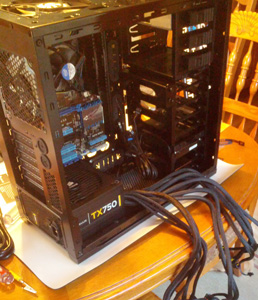
The case is awesome and just looks cool. I really like all the open spots and fans that keep everything running cool, and there’s plenty of space inside to work with when installing components. I also like the idea that the power supply is placed at the bottom of the case, which helps to keep it a bit cooler and keeps the fan noise down.
Ah, the operating system. A friend of mine told me that I should get Windows 8, but I couldn’t bring myself to do it. I need a machine that I can do work with, and I don’t have the patience to fool around with a new operating system. Plus, I’ve heard that Windows 8 works best with a touchscreen interface, so I’m waiting to take the Windows 8 plunge until I get a touchscreen monitor.
Overall, I’m really pleased, and I’m really thankful for the folks at Maximum PC for simplifying the component selection process. If the lifetime of my last machine is any indication, I suspect that I’ll be using this rig for the next 7-10 years.
A “freemium” is a version of a company’s product or service that they offer to users for free. It’s a great way to get users to try out a product or service. I’ve signed up for many myself. In some cases, the company offering the freemium tries to make money through advertising, but unless your product is Gmail, they don’t make much through ads. Most of the money is made when users convert to their premium, or paid, products.
For many web services, the freemium version is a feature rich product, So much so that you can do a lot without ever paying a penny. Prominent examples that come to mind are Dropbox, Evernote and RunKeeper.
While it would be easy to continue using these services without ever paying, I decided it was time last year to support the web services that I’m getting value from. For example, the premium version of Evernote is $45 – for the year! To put it in perspective, it’s less than $4/month, or just over 10¢ per day. It was pretty obvious that I was getting way more value than $4 per month from the product. Look at it this way: I spend more than that in one trip to Starbucks, and that fix only lasts a couple of hours. There’s even the added bonus of getting a few extra features, which makes the upgrade even that much easier to pull the trigger on.
In many cases, the annual fee for a service is even less than Evernote’s. I also subscribe to Remember the Milk, a to-do list manger that has helped me immensely over the last year. It only costs $25 for the year. Another of my favorites is RunKeeper, which is a downright bargain at only $20 for the year. Given how much I use these services, paying these small fees is the least I could do. I view it as doing my part to help insure that these application are available in the future.
So what’s my advice? By all means, take advantage of the freemium model. Use it to try services and see if they add value. Once you determine they do, then upgrade to the premium version and pay the nominal annual fee. If not for the additional features, do it to support the teams who are making it happen so they can continue to work on and develop the product. Otherwise, you have no right to complain when the service you love and depend on falls into a state of disrepair and eventually goes away.

 My favorite use for the credit card processing service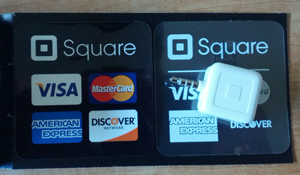
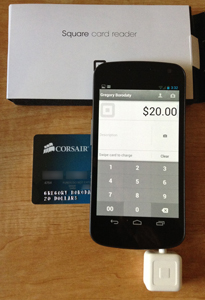 For example, I recently got a $20 rebate check from Corsair for the power supply I purchased for my latest computer. Instead of carrying the card around and finding ways to use it, I loaded up the Register app on my phone, plugged in the dongle, logged into the account, and paid myself the $20. Sure, Square charges a flat card processing fee of 2.75%, so I lost $0.55, but I would have probably lost a lot more than that when the balance got down to a couple of dollars.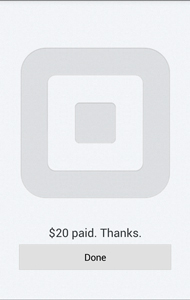
 As a recovering Google Reader addict
 A little over a month ago, the following article appeared in my Google Reader: “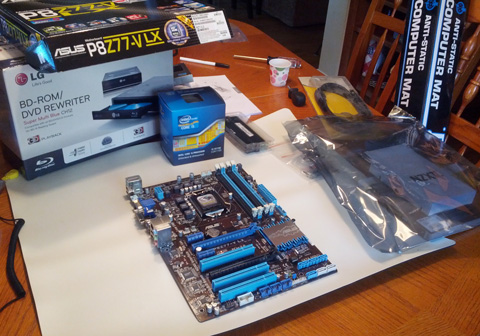
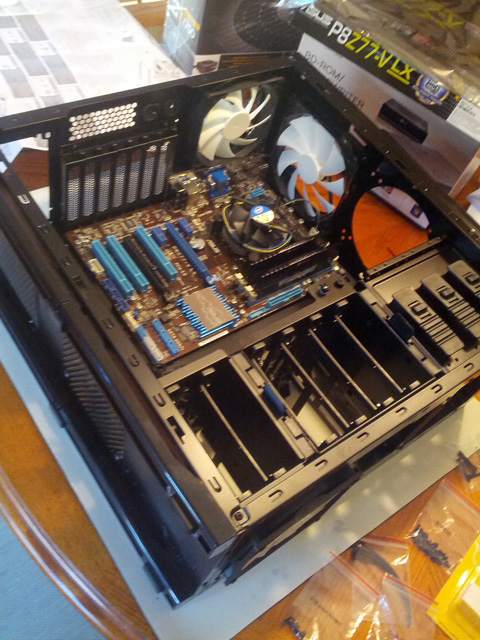 The case is awesome and just looks cool. I really like all the open spots and fans that keep everything running cool, and there’s plenty of space inside to work with when installing components. I also like the idea that the power supply is placed at the bottom of the case, which helps to keep it a bit cooler and keeps the fan noise down.